Now on Azure Marketplace
Your own private PKI — without the servers.
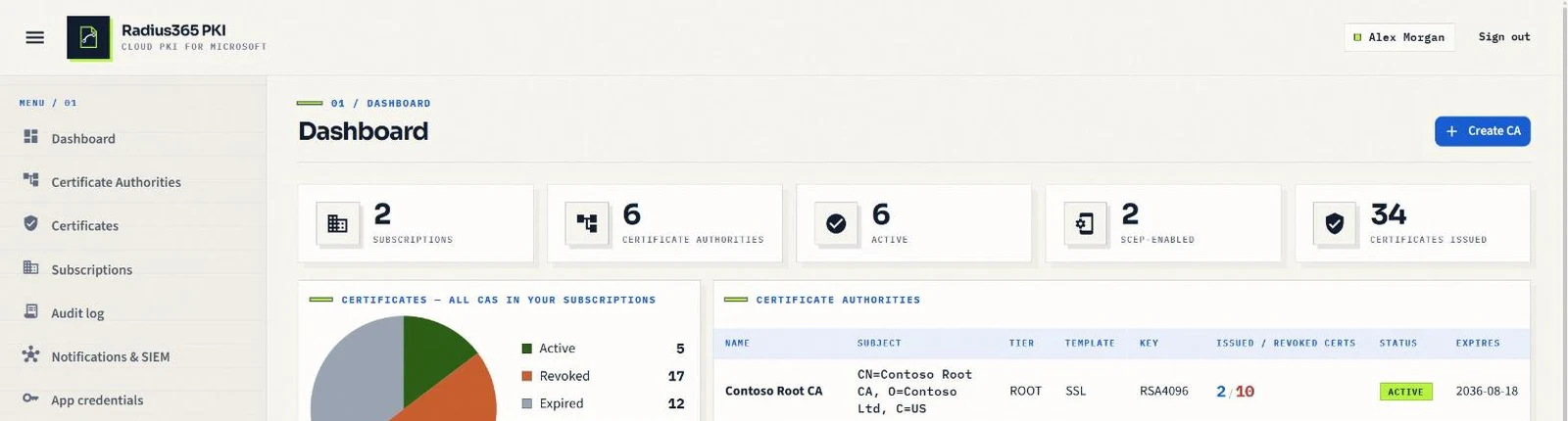
Radius365 PKI is a managed certificate authority that lives in Azure. Auto-enroll Intune devices over SCEP, automate TLS with ACME, issue straight into Azure Key Vault, rotate Entra app credentials and sign short-lived SSH certificates — with CA keys that never leave an HSM-backed Key Vault.
Marketplace
Azure billing
Protocols
SCEP · ACME · RADIUS · SSH
Keys
HSM, non-exportable
- 01Intune
- 02Radius365
- 03Key Vault
- 04Entra
The problems it removes
Certificates are still run by hand in most organisations.
Private PKI is essential for Wi-Fi, VPN, device identity and internal TLS — and it is usually the least automated part of the stack.
Certificate sprawl and surprise expiries
Nobody knows how many certificates exist, who issued them or when the next one expires until a service goes down.
App secrets that expire on a Friday night
Entra app registrations authenticate with client secrets that someone has to remember to rotate — and rarely does.
ADCS servers to patch, back up and secure
An on-premises CA means Windows servers, an offline root you hope still boots, and a private key that must never leak.
No audit trail you would show an auditor
Issuance and revocation happen in consoles and scripts; the evidence is scattered across event logs and mailboxes.
Private keys that end up on disks
CA keys exported to PFX files, copied to laptops and shared drives — the opposite of what a CA key should ever do.
What you get
A CA you subscribe to, not one you operate.
- 01
Running in minutes
Subscribe on Azure Marketplace, grant consent once, create a Root CA — no VMs, no PKI servers, nothing deployed in your network.
- 02
Keys that cannot leave the HSM
CA keys are generated and kept non-exportable in Azure Key Vault Premium; every signature is computed inside the HSM.
- 03
Automation instead of tickets
Devices enroll over SCEP, servers renew over ACME, vault certificates rotate themselves, app credentials are re-issued before they expire.
- 04
Evidence built in
An append-only audit log of every issuance, revocation and change, streamed to Sentinel, Splunk or a webhook.
- 05
Governance without friction
Decide who may issue certificates for which domains, with owners, requesters and approval — enforced across portal, API and ACME.
- 06
Predictable cost
Flat monthly plans on your Azure invoice. No per-certificate and no per-user fees.
Platform
Everything a private CA needs, delivered as a service.
Each capability is available from the portal and the REST API, with the same audit trail behind it.
- 01
HSM-protected CA keys
Root and subordinate CA keys are generated and stay inside Azure Key Vault Premium. Non-exportable, with every signature computed in the HSM.
Learn more - 02
Intune SCEP enrollment
Native Intune third-party CA validation for Windows, iOS, macOS and Android. Device and user certificates for Wi-Fi, VPN and certificate-based sign-in.
Learn more - 03
Cloud RADIUS for Wi-Fi and VPN
Managed RADIUS servers your access points and VPN gateways talk to. EAP-TLS with the certificates Intune already pushed, MAC bypass for devices without one, VLANs by Entra group or Intune compliance. No NPS.
Learn more - 04
ACME automation
Let's Encrypt-style issuance for certbot, win-acme and cert-manager, with http-01 / dns-01 validation and External Account Binding — no agent required.
Learn more - 05
Azure Key Vault issuance & rotation
Issue certificates straight into your own vault and let them auto-rotate. The private key never leaves your vault.
Learn more - 06
Entra app credential rotation
Replace expiring client secrets with certificate credentials published to app registrations through Microsoft Graph and rotated automatically with a grace period.
Learn more - 07
Domain ownership & approval
Register and approve domains per CA; owners and requesters decide who may issue for which DNS names — enforced across portal, API and ACME.
Learn more - 08
SSH certificates
An OpenSSH CA with short-lived, audited user certificates and revocation via KRL. Included in the plan — no per-user fee.
Learn more - 09
Audit log & SIEM export
Append-only record of every action, lifecycle e-mail notifications, and export to Log Analytics / Sentinel, Splunk or any webhook.
Learn more
How it works
From Marketplace to your first certificate in five steps.
- STEP 01
Subscribe on Azure Marketplace
Pick a plan; it bills on your Azure invoice. Activation brings you to the portal.
- STEP 02
Grant consent once
A Global Administrator consents the Entra apps so your users sign in with their work accounts. Nothing is installed in your tenant.
- STEP 03
Create a Root CA
Or chain a subordinate CA under your existing ADCS or offline root. Keys are created in the HSM.
- STEP 04
Pick a template
TLS/SSL, SCEP for Intune and MDM, ACME, or an SSH CA — with validity, key sizes, SANs and EKUs as policy.
- STEP 05
Issue, automate, operate
Issue from the portal, the API, Key Vault, SCEP or ACME. Revoke, publish CRL/OCSP, renew the CA in place and stream everything to your SIEM.
Integrations
Built for the Microsoft stack you already run.
Every integration below is available today — nothing on this list is a roadmap item.
- Microsoft Intune (SCEP)
- Microsoft Entra ID
- 802.1X network equipment — RADIUS (UDP) and RadSec
- Azure Key Vault
- Azure Marketplace billing
- certbot, win-acme, cert-manager (ACME)
- Microsoft Sentinel / Log Analytics
- Splunk HEC
- Generic webhook (Teams, ServiceNow, …)
- OpenSSH (user certificates, KRL)
- Active Directory Certificate Services (chaining)
Security
Designed so that a CA key can never be copied.
HSM-only keys
CA private keys live in FIPS 140-2 validated HSMs (Azure Key Vault Premium) and are non-exportable by policy.
Entra ID only
No local passwords. Administrators are Entra users, groups or service principals; the last administrator can never be removed by accident.
Tenant isolation
Every customer is isolated by Entra tenant; data is hosted in Microsoft Azure — EU (West Europe) or United States, chosen at activation.
Append-only audit
Every issuance, revocation and permission change is recorded and can be streamed to your SIEM.
Use cases
Where teams put it to work.
Wi-Fi and VPN with EAP-TLS
Device and user certificates pushed by Intune SCEP profiles, authenticated by Radius365's own cloud RADIUS servers — or by your existing one. Devices removed from Intune are revoked automatically.
Certificate-based sign-in to Entra ID
User certificates with UPN and e-mail SANs for phishing-resistant authentication.
Internal TLS on autopilot
Web servers, load balancers and Kubernetes ingresses renew through ACME without anyone touching them.
Certificates that live in Key Vault
App Service, Application Gateway and your own apps read the current version from the vault; rotation is invisible to them.
No more expiring app secrets
Entra app registrations authenticate with a certificate that Radius365 renews before it expires.
SSH access for admins and DevOps
Eight-hour SSH certificates tied to the signed-in user, accepted by any OpenSSH server with one line of configuration.
For MSPs and enterprises
One platform, many tenants, clear boundaries.
Radius365 is multi-tenant by design: each customer signs in with its own Entra tenant and sees only its own subscriptions, CAs and certificates.
Administration by identity
PKI administrators are added by user, Entra group or service principal; invitations go out by e-mail.
Capacity you can plan for
Published, measured issuance capacity and per-plan rate limits — 3,000, 10,000 or 25,000 certificates per hour per CA.
Room to grow
Up to 10 certificate authorities on the Enterprise plan, full Root and Subordinate hierarchies, and CA renewal without an outage.
Pricing
Flat monthly plans, billed through Azure Marketplace.
No per-certificate and no per-user fees. Prices exclude VAT; yearly billing is available.
Basic
€199 per month
1 certificate authority
3,000 certificates / hour
- All issuance protocols: portal, SCEP + Intune, ACME
- CRL & OCSP publishing
- Lifecycle e-mail notifications
- Audit log, REST API, help center
7-day free trial
- Most popular
Premium
€399 per month
Up to 3 certificate authorities
10,000 certificates / hour
- Everything in Basic
- Full Root + Subordinate hierarchies
- Key Vault issuance & app credential rotation
- SSH certificates & SIEM export
Enterprise
€799 per month
Up to 10 certificate authorities
25,000 certificates / hour
- Everything in Premium
- Priority support
- For PKI at organisation scale
Subscriptions are created only by activating a plan purchased on Azure Marketplace.
FAQ
Questions we hear first.
01Where are the CA private keys?
In Azure Key Vault Premium, on FIPS 140-2 validated HSMs, created non-exportable. Radius365 only asks the vault to sign; nobody — including us — can download a CA key. Certificates issued into your own Key Vault keep their private key in your vault.
02Can it replace our NPS / RADIUS server for Wi-Fi?
Yes, for certificate-based access. Network access (Enterprise plan) gives you two managed RADIUS servers: your access points, switches and VPN gateways authenticate devices with EAP-TLS against the certificates your Radius365 CA issued, admit printers and sensors by MAC address, and put each device on a VLAN by policy — certificate, SSID, Entra group or Intune compliance. Password methods such as PEAP are intentionally not offered.
03Do I need to deploy anything in my network?
No. The service runs in Azure; your users sign in with their Entra work accounts after a one-time admin consent. Devices enroll through Intune, servers through ACME clients you already use.
04How does it work with Intune?
Radius365 implements Intune's third-party CA integration: you create a SCEP profile in Intune, Intune validates each request with us, and the certificate is issued only after that confirmation. Devices removed from Intune are revoked automatically.
05What does it cost and is there a trial?
Three flat plans on Azure Marketplace — Basic €199, Premium €399 and Enterprise €799 per month (excl. VAT) — with a 7-day free trial on Basic. There are no per-certificate or per-user fees.
06How is revocation handled?
Every CA publishes a CRL and can answer OCSP; revocation is immediate in the portal and the API. SSH certificates use an OpenSSH key revocation list (KRL) that servers refresh automatically.
07Where is my data hosted?
In Microsoft Azure — European Union (West Europe, Netherlands) or United States, chosen once when you activate your subscription. Each customer is isolated by Entra tenant. Details are on the Trust & Security page of the portal.
08Can I chain under my existing ADCS root?
Yes. Create a subordinate CA with an external parent: Radius365 gives you a CSR, your ADCS or offline root signs it, and you upload the certificate. Your devices keep trusting the same root.
09How do I get support?
By e-mail at support@radius365.org, with the documentation and step-by-step tutorials in the help center. The Enterprise plan includes priority support.
See it on your own tenant.
Ask for a guided demo, or start directly from Azure Marketplace with a 7-day trial.
Radius365 PKI
Cloud private certificate authority for Microsoft 365 & Azure
7-day free trial