Product
Everything a private PKI needs — run for you in Azure.
Radius365 PKI is a managed certificate authority for Microsoft 365 and Azure environments. You create the hierarchy and the policy; the platform issues, renews, revokes and audits — through the portal, the REST API, Intune SCEP, ACME, Azure Key Vault and OpenSSH.
Keys
CA keys that never leave an HSM
A CA is only as trustworthy as its private key. On self-managed PKI the key ends up on a server disk, in a backup or in someone's home directory — and one copy is enough to forge certificates for the whole organisation.
How it works
- 01
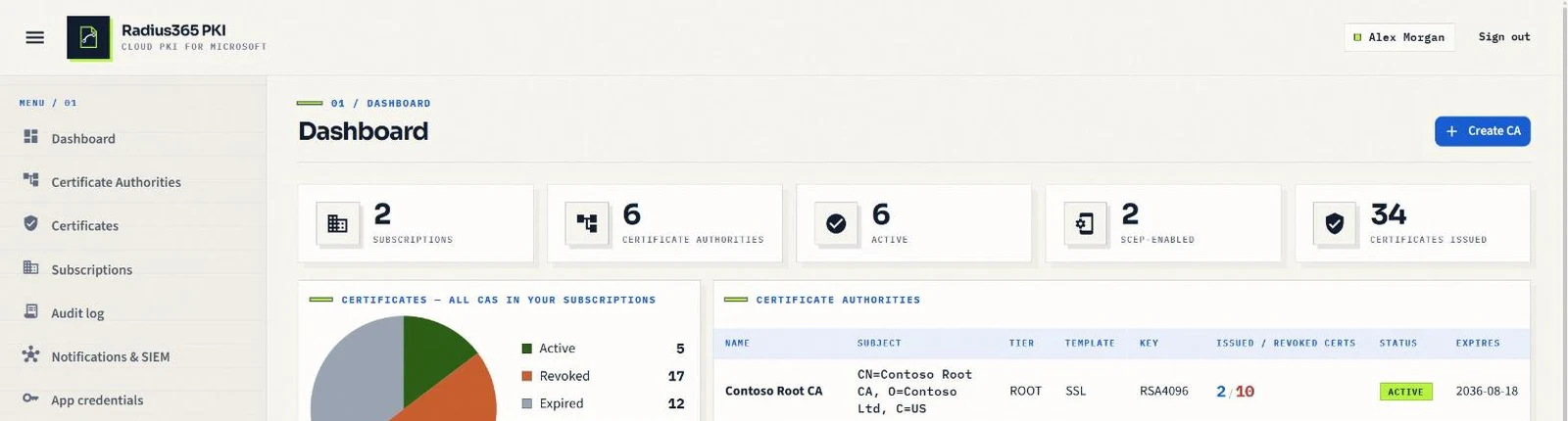
Every CA key is generated inside Azure Key Vault Premium, on HSM-protected, non-exportable keys (RSA 2048–4096 or ECDSA P-256/P-384).
- 02
Every signature — certificates, CRLs, OCSP responses, SSH certificates — is computed by the HSM; the platform only sends the data to sign.
- 03
Deleting a CA removes its key from the vault; the audit trail keeps the record of what it signed.
Benefit
You get the assurance level of a hardware-backed enterprise CA without owning, patching or backing up a single HSM.
CA lifecycle
Root and issuing CAs, with or without your existing root
Hierarchies are hard to change later: a root that expires, an issuing CA that must be replaced, or an on-premises ADCS root that has to stay the trust anchor because it is already deployed to thousands of devices.
How it works
- 01
Create a self-signed Root CA and any number of Subordinate (issuing) CAs under it, each with its own template and policy.
- 02
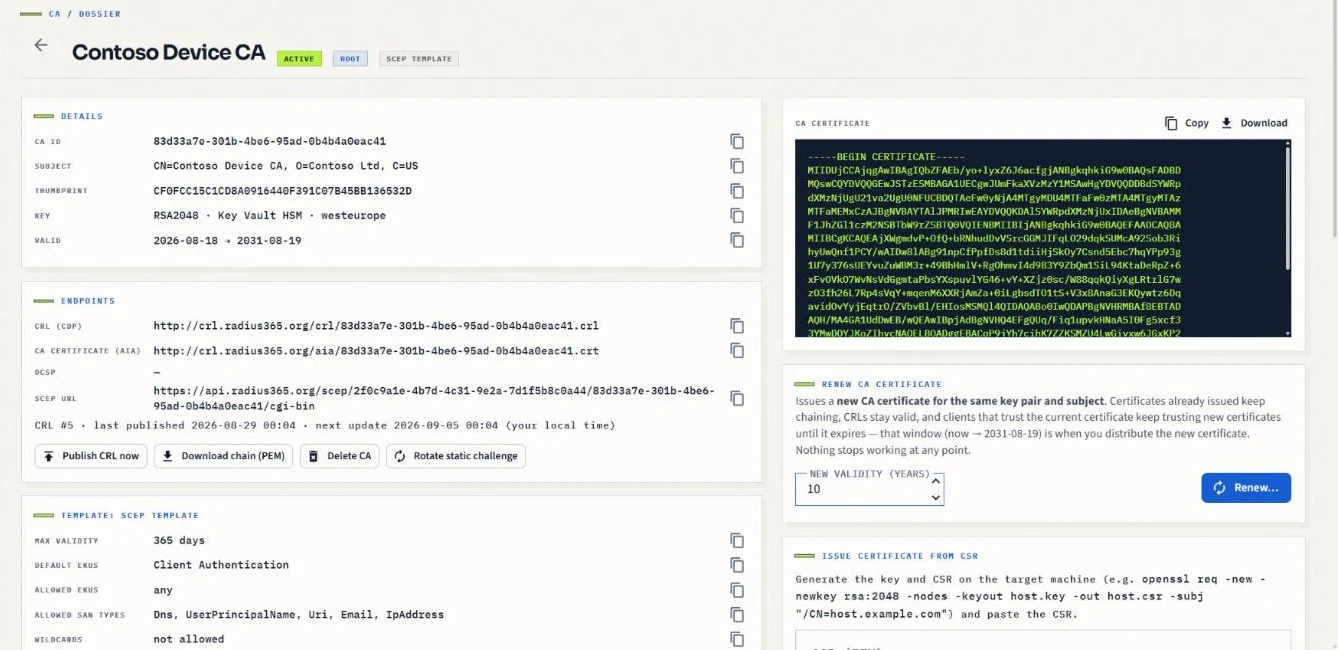
Chain a cloud issuing CA under your existing ADCS or offline root: the platform produces the CSR, you sign it on-premises and upload the certificate — devices keep trusting the root they already have.
- 03
Renew a CA in place with the same key: existing certificates, chains and CRL distribution points keep working; nothing has to be redistributed.
- 04
Revocation is published automatically: CRL and AIA on public HTTP endpoints, a live OCSP responder per CA, and a KRL for SSH CAs.
Benefit
Your trust anchors stay stable for years while the operational parts — issuing CAs, templates, revocation — evolve without outages.
Devices
Intune SCEP enrollment, validated by Intune itself
Device and user certificates for Wi-Fi, VPN and certificate-based sign-in usually mean an NDES server, a connector and a CA to patch — and a SCEP endpoint that accepts anything that knows the URL.
How it works
- 01
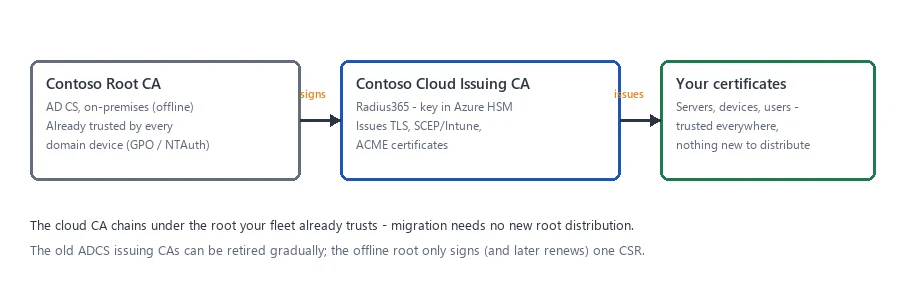
Create a SCEP CA and paste its SCEP URL into an Intune SCEP profile for Windows, iOS/iPadOS, macOS or Android.
- 02
Each request is validated with Intune's third-party CA API before a certificate is issued; devices removed from Intune are revoked automatically.
- 03
Static challenge passwords are available for Jamf, NinjaOne and other MDMs that do not use the Intune API.
- 04
Issued certificates carry the device or user identity, so the audit log shows which device got which certificate.
Benefit
Wi-Fi (EAP-TLS), VPN and Microsoft Entra certificate-based authentication roll out from the Intune console, with no on-premises component.
Network access
Cloud RADIUS: Wi-Fi and VPN authenticated by certificate
802.1X needs a RADIUS server, and that server is the part nobody wants to run: an NPS box per site, PEAP passwords going over the air, and cloud-only devices that cannot reach the domain controller it validates against.
How it works
- 01
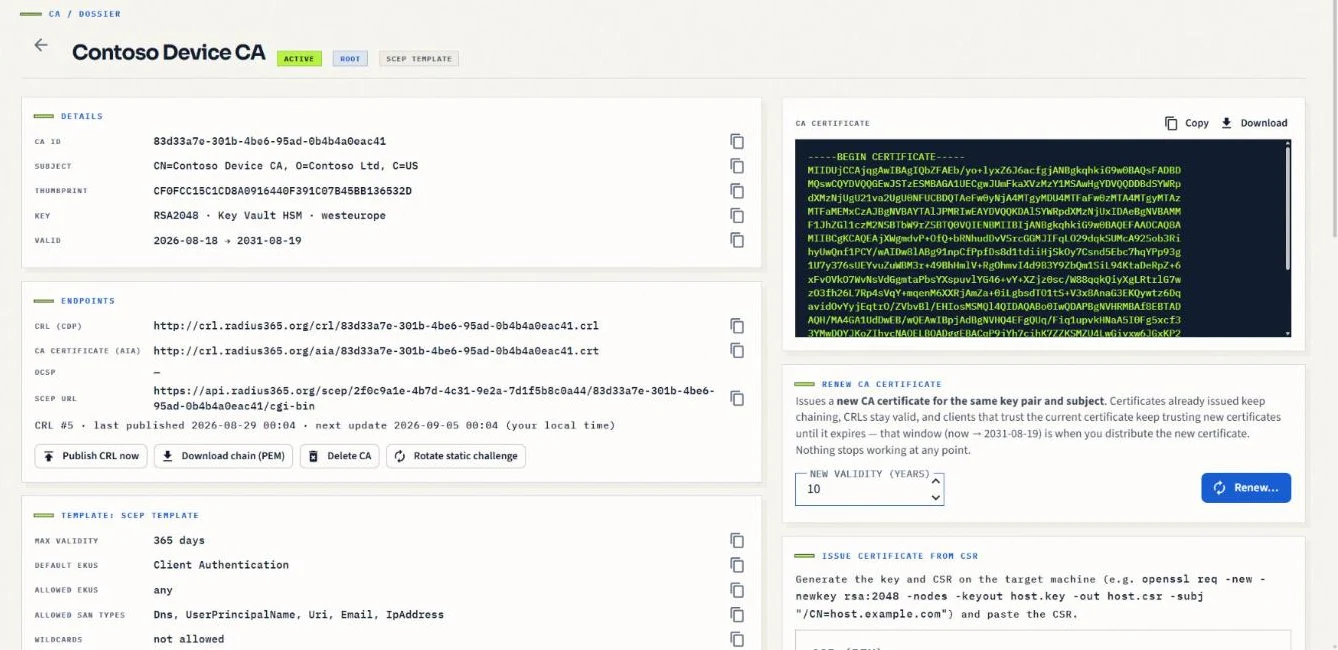
Register your access points, controllers, switches or VPN gateways as RADIUS clients — by source address for UDP (a site can list its main and backup line), or by certificate thumbprint for RadSec.
- 02
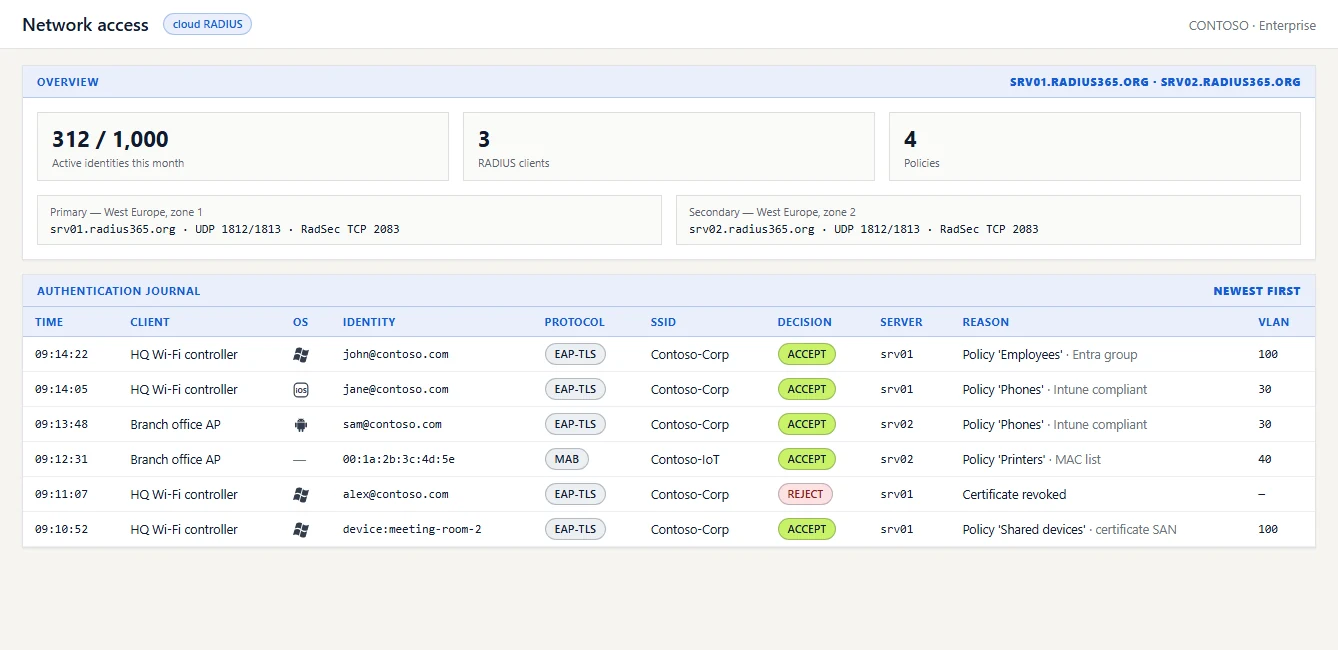
Point them at srv01 and srv02.radius365.org (UDP 1812/1813 or RadSec 2083): two managed servers in different availability zones, the NAS fails over by itself.
- 03
Devices authenticate with EAP-TLS using the certificates your Intune SCEP profiles already issued; the engine checks chain, validity and revocation against your CA. Devices without a certificate can be admitted by MAC address (MAB).
- 04
Policies evaluate first-match: issuing CA, certificate SAN or subject, SSID, RADIUS client, MAC, Entra group membership, Intune compliance — and assign a VLAN and attributes. Every attempt lands in the authentication journal with identity, OS, decision, policy and server.
Benefit
The SSID password goes away, the NPS servers with it: certificate-only network access that works for Entra-joined and Intune-managed devices wherever they are, with a journal that answers why a device landed on a VLAN.
Servers & workloads
ACME automation for internal TLS — no agent
Internal web servers, reverse proxies and Kubernetes ingresses need TLS certificates that someone renews on time. Manual renewals are how internal outages happen at 2 a.m.
How it works
- 01
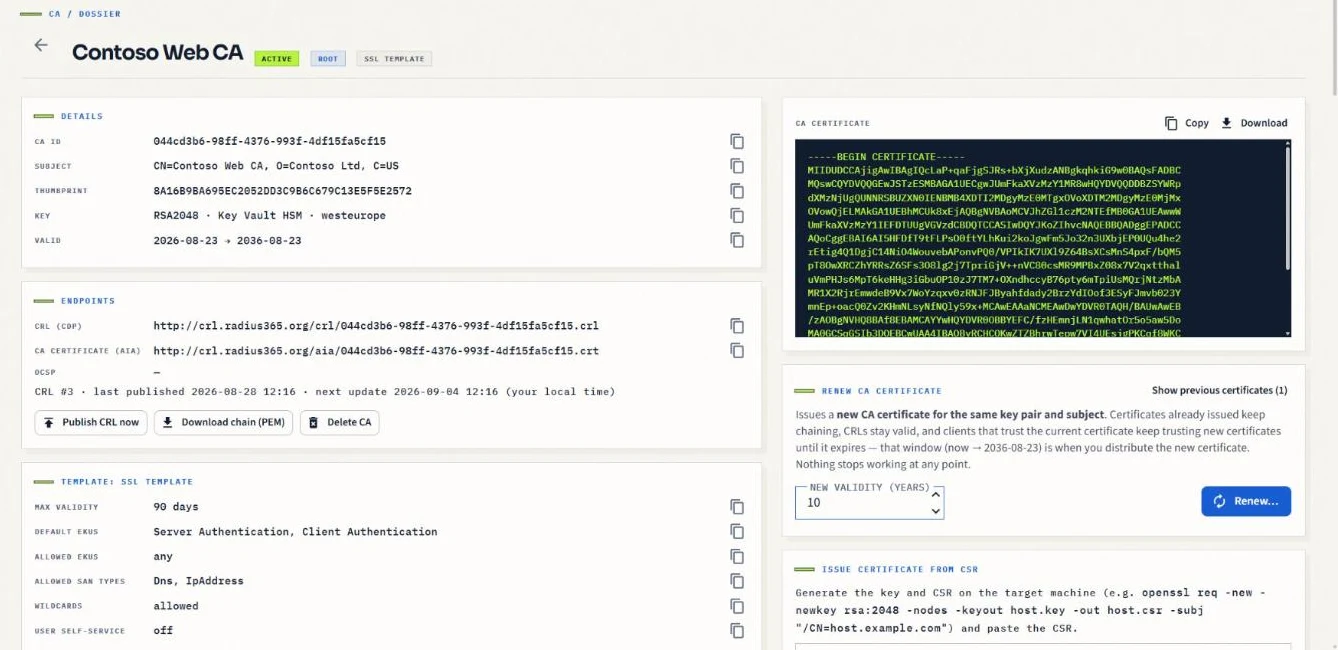
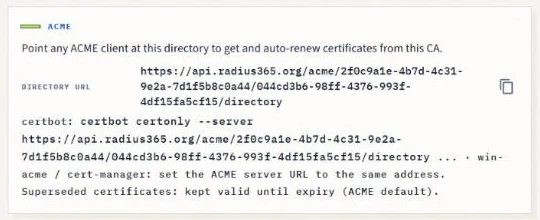
Enable ACME on an SSL template and point certbot, win-acme, cert-manager or any RFC 8555 client at the CA's directory URL.
- 02
External Account Binding keys keep strangers out of the directory; http-01 and dns-01 challenges are validated from the cloud.
- 03
Superseded certificates can be revoked automatically when a client renews, keeping CRLs small.
- 04
Renewals trigger a “certificate renewed” notification, and missed renewals raise an alert before expiry.
Benefit
The renewal loop your public certificates already have — applied to your internal names, with your own CA.
Azure Key Vault
Issue straight into your Key Vault — and rotate automatically
Certificates for App Service, Application Gateway, Front Door or your own workloads live in Key Vault, but somebody still has to create the CSR, get it signed and merge the result before it expires.
How it works
- 01
The platform asks your vault to create the key pair, signs the resulting CSR with your CA and merges the certificate back — the private key never leaves your vault.
- 02
Auto-renewal issues a new version at the percentage of lifetime you choose; services that read from Key Vault pick it up without a redeploy.
- 03
Access is granted by you, to the platform's identity, with the Key Vault Certificates Officer role on the vaults you choose.
Benefit
Vault-hosted certificates that renew themselves, signed by your private CA instead of a public one.

Microsoft Entra ID
Never let an app secret expire again
Client secrets on Entra app registrations expire, and when they do an integration stops — usually without anyone noticing until a job fails. Certificate credentials are safer, but rotating them by hand is worse.
How it works
- 01
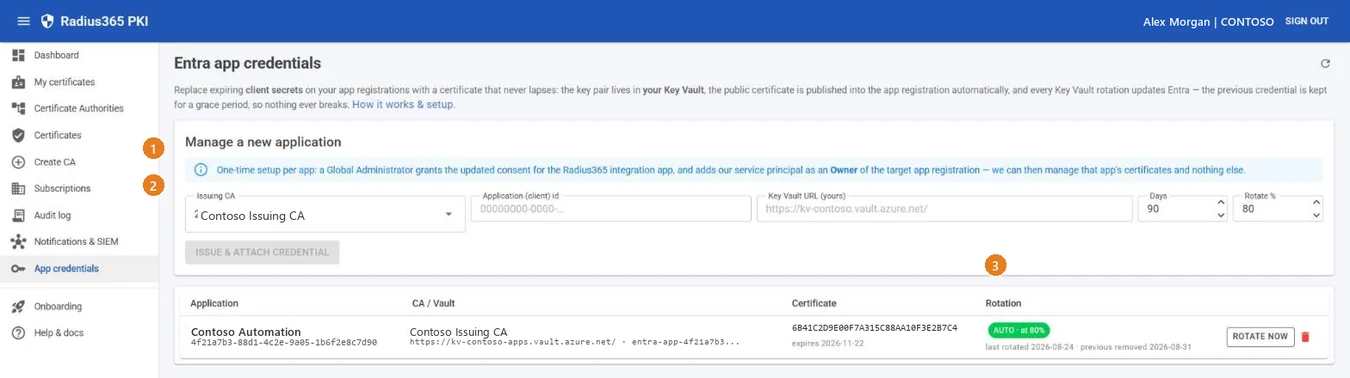
Pick the app registration, the issuing CA and a Key Vault you own; the platform issues a client-authentication certificate into that vault and publishes it to the app's key credentials through Microsoft Graph.
- 02
Rotation follows the vault's schedule: a new certificate is issued and published, the old one is removed after a grace period, and a failed publish never removes a working credential.
- 03
The platform can only manage app registrations where its service principal is an owner — a deliberately narrow permission.
Benefit
Applications read the certificate from Key Vault and simply keep working through every rotation; the expiring-secret problem disappears.
Governance
Domain ownership and approval
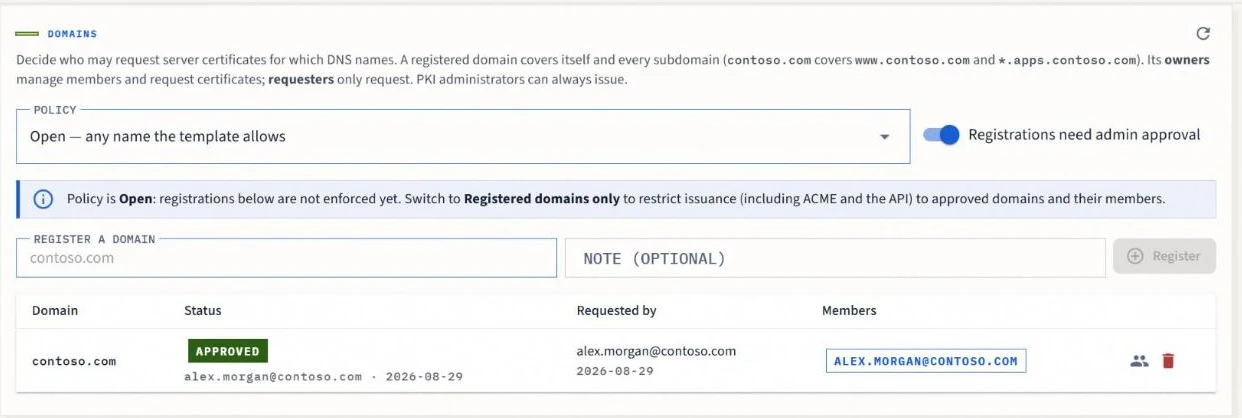
A CA that issues server certificates for any name is a liability: any authorised requester could ask for a certificate for the payroll host or the sign-in domain.
How it works
- 01
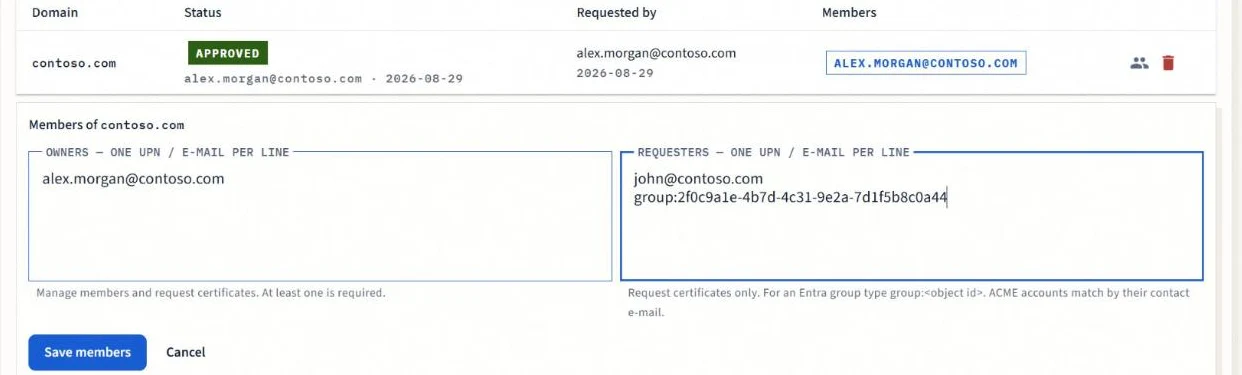
Register the organisation's domains on a CA; a registered domain covers its subdomains and wildcards.
- 02
Users request the domains they are responsible for; administrators approve or reject with a note, and everyone is notified by e-mail.
- 03
Owners and requesters — users, Entra groups or ACME accounts — decide who may issue for each domain.
- 04
Switch the CA policy to “registered domains only” and the rule applies everywhere: portal, REST API, ACME and self-service.
Benefit
Delegated, auditable control over which team can issue certificates for which DNS names.
SSH
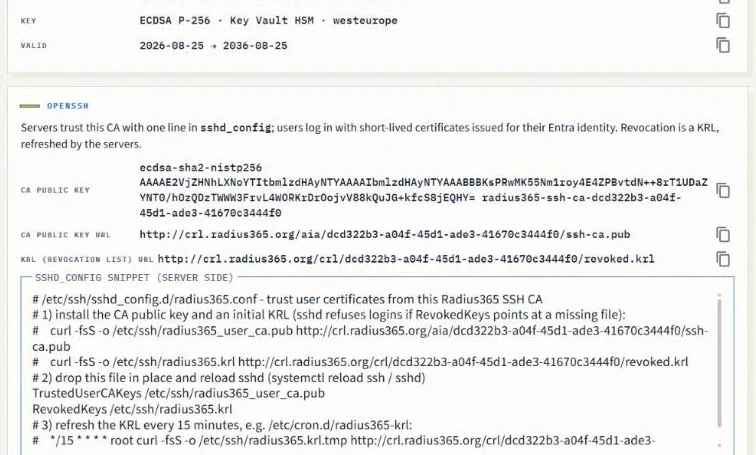
Short-lived SSH certificates from an HSM-backed SSH CA
Permanent SSH keys accumulate in authorized_keys files on every server, outlive the people who created them and cannot be revoked centrally.
How it works
- 01
Create an SSH CA; servers trust it with a single TrustedUserCAKeys line and refresh its key revocation list on a schedule.
- 02
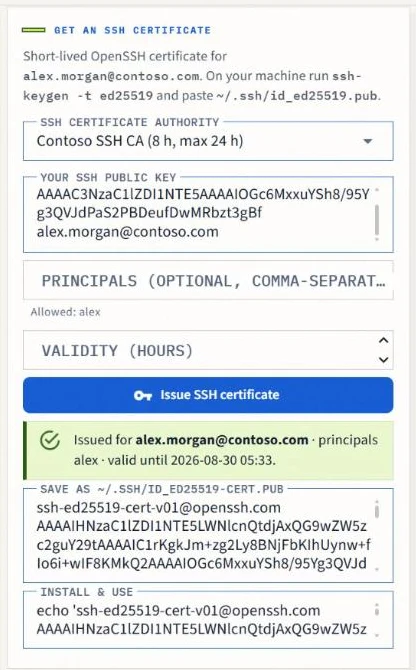
Signed-in users paste their public key and receive an OpenSSH certificate bound to their identity — 8 hours by default, 24 at most — for the account names your policy allows.
- 03
sshd logs the certificate's key id and serial at every login, so the audit trail leads back to the person, not to a shared key.
- 04
Included in the Premium and Enterprise plans; an SSH CA counts as one certificate authority.
Benefit
Server access tied to Entra sign-in that expires by itself — no key distribution, no per-user fee.
Self-service
Let users help themselves — within the policy you set
Every personal certificate request that lands on the PKI team is a ticket: a certificate for sign-in, a PFX for e-mail signing, a domain registration, an SSH certificate.
How it works
- 01
My certificates shows each user the certificates issued to them and lets them request a personal certificate (PFX) from CAs that administrators opened for self-service.
- 02
Users register the domains they own and request SSH certificates for themselves; administrators keep approval and policy.
- 03
Every self-service action is audited and rate-limited like any other issuance.
Benefit
Fewer tickets for the PKI team, faster answers for users, and the same controls for both.
Audit
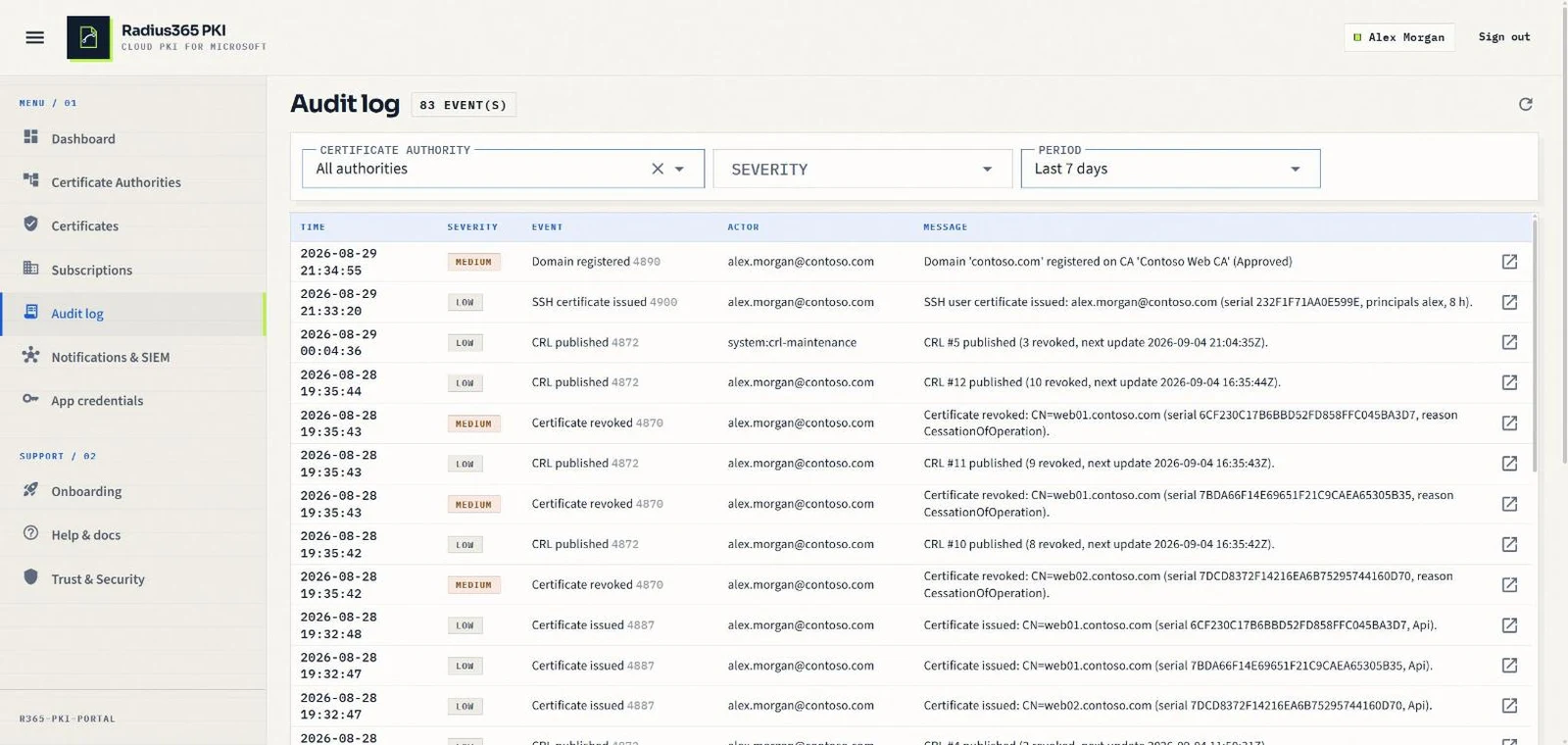
An append-only record of every issuance, revocation and change
When an auditor asks who issued a certificate for a host last March — or who changed the CA's policy — most PKIs answer with a shrug and a log file that rotated months ago.
How it works
- 01
Every issuance, revocation, CRL publication, CA change, permission change and denied request is written to an append-only audit log with the actor, the target and the reason.
- 02
Event codes mirror Windows ADCS where an equivalent exists, so existing detection rules keep working.
- 03
Filter by CA, severity or period in the portal, or query the same events through the REST API.
Benefit
Answers in minutes, evidence for audits, and the same record for certificates, SSH and administrator actions.
Operations
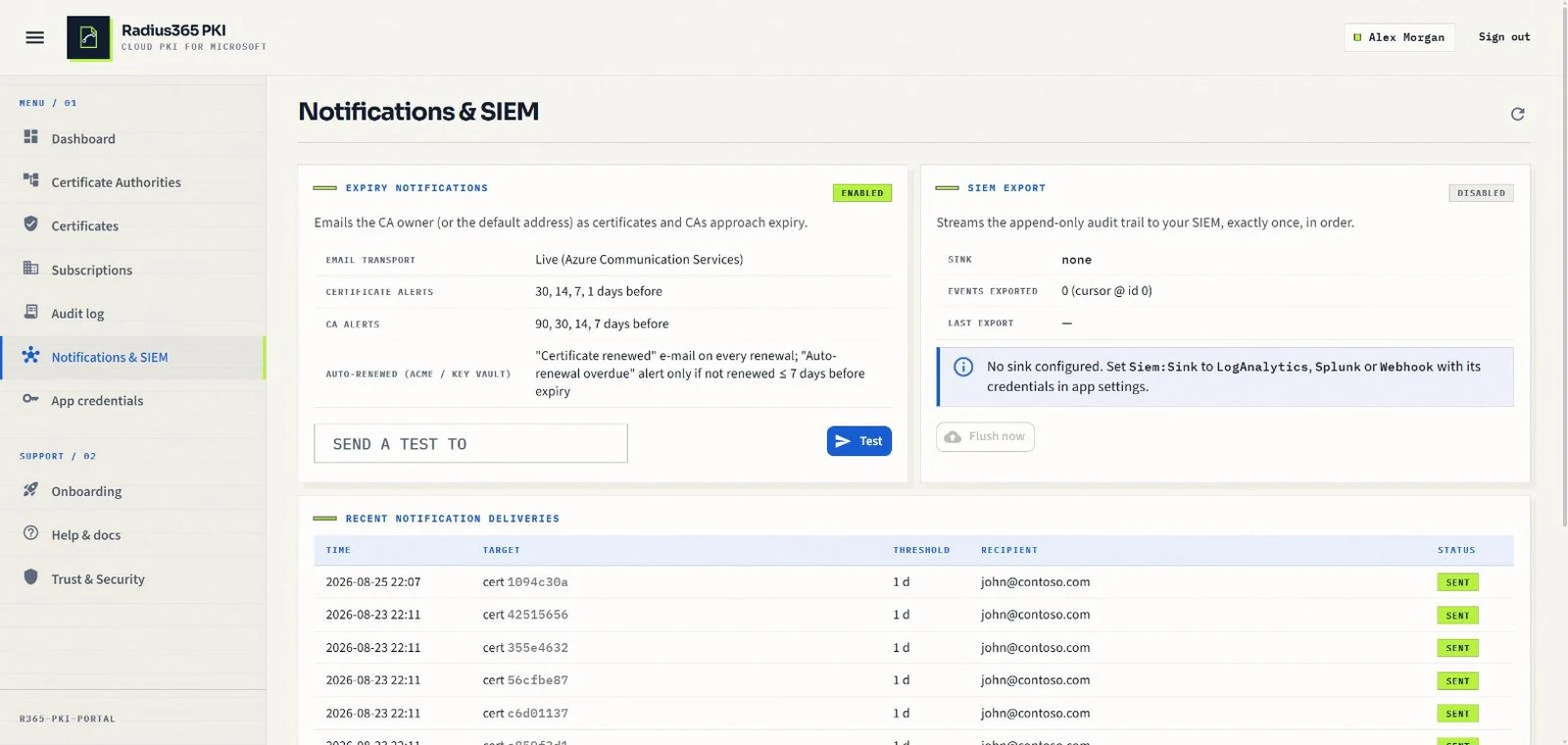
Lifecycle notifications and SIEM export
Expiry reminders are either missing or so noisy for auto-renewed certificates that people stop reading them; security teams want the events in the tools they already use.
How it works
- 01
Expiry e-mails for manually managed certificates; for ACME and Key Vault-managed ones, a “certificate renewed” confirmation and an “auto-renewal overdue” alert instead of reminders.
- 02
Stream the audit log to Microsoft Sentinel / Log Analytics, Splunk HEC or a generic webhook — exactly once, in order.
- 03
Delivery history shows what was sent, to whom and whether it succeeded.
Benefit
Nobody learns about an expired certificate from an outage, and every PKI event lands in your SIEM.
Plans
Capabilities at a glance
Every plan includes the full issuance and revocation stack; the larger plans add more certificate authorities, higher issuance rates and the integrations that need your own Key Vault.
| Feature | Basic | Premium Most popular | Enterprise |
|---|---|---|---|
| Certificate authorities | 1 | 3 | 10 |
| Issuance rate (per CA) | 3,000 / hour | 10,000 / hour | 25,000 / hour |
| Portal, REST API and Swagger | |||
| Root and subordinate CAs, ADCS chaining | |||
| Intune SCEP and static challenge | |||
| ACME (RFC 8555) with EAB | |||
| CRL, AIA and OCSP publishing | |||
| Domain ownership and approval | |||
| Lifecycle e-mail notifications | |||
| Append-only audit log | |||
| Azure Key Vault issuance and auto-rotation | — | ||
| Entra app credential rotation | — | ||
| SSH certificates (OpenSSH CA) | — | ||
| Network access — cloud RADIUS (EAP-TLS, MAB, RadSec) | — | 50-identity preview | 1,000 identities / month |
| SIEM export (Sentinel, Splunk, webhook) | — | ||
| Priority support | — | — |
Plans are billed through the Microsoft commercial marketplace; a 7-day free trial is available on Basic. Prices and terms are on the pricing page. See pricing →
See it on your own tenant
A demo takes thirty minutes: we walk through your use case — Intune, ACME, Key Vault or SSH — on a live environment.