Skip to content
SCEP Field Guide
Interactive implementation guide

Personal certificates on every device,
without an NDES server.

Build a Radius365 SCEP issuing path, push trust and enrollment through Intune, and confirm every certificate lands in the right hands — one small pilot at a time.

Guided pilot50–60 min
Systems4 connected
Rollout modelPilot first
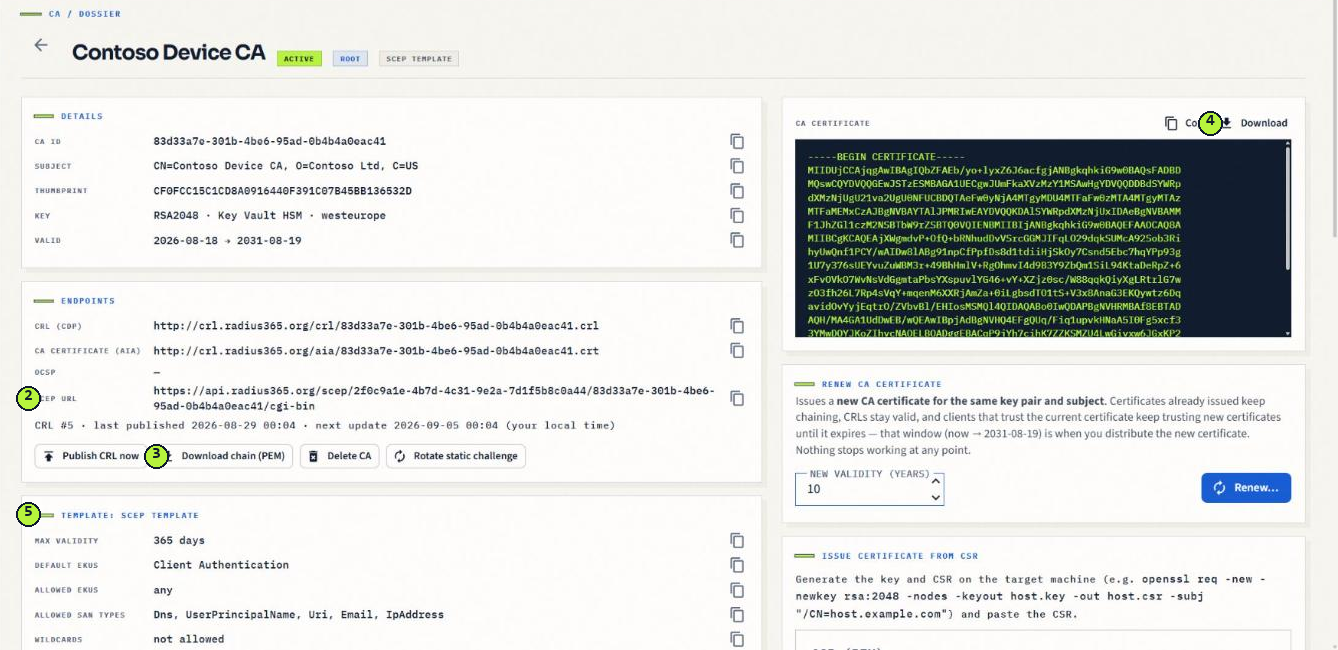
Radius365 CA page showing the SCEP URL, CA certificate and Intune-validated SCEP template
FIELD02SCEP / 2026
Built for a controlled pilot
01 / TRUST MODEL

Certificate journey

Select a node to see its responsibility.

PLATE / A
Radius365

Issues the certificate through SCEP, validates every request with Intune, and publishes the CRL.

02 / PRE-FLIGHT

Before you touch Intune

A good SCEP rollout starts with a small pilot group and a Global Administrator on standby for one-time consent.

Never assign the SCEP profile to All devices or All users before a pilot has verified enrollment.
Pilot readiness0/4
4 checks remaining
00 / 08
00Radius3655 min
Start safely

Plan a small, reversible pilot.

STEP00
Outcome

A pilot device group, a pilot user group and a Global Administrator ready for one-time consent.

Required roleRadius365 PKI administrator

Before you begin

Identify 2–5 pilot users on managed Windows devices.

Confirm a Global Administrator is available for a one-time consent step.

Do this

  1. 01

    Create (or reuse) an Intune device group for pilot devices, e.g. Contoso - Pilot devices.

  2. 02

    Create an Intune user group for pilot users, e.g. Contoso - Pilot users.

  3. 03

    Confirm the pilot devices are already enrolled and checking in to Intune.

CHECKPOINT

Verify before continuing

03 / DIAGNOSE

Troubleshoot by symptom

Start with the system that reported the failure. SCEP is a chain of dependencies; the error is usually local to one link.

Intune

SCEP profile stays Pending on the device

The root is not trusted yet. Confirm the Trusted certificate profile reached the device first, and that the SCEP profile's Root Certificate points at it.

Intune

SCEP profile shows Error

Usually the SCEP URL (must end in /cgi-bin) or a subject/SAN the template does not allow. Check the Radius365 Audit log — a Request denied event names exactly what was rejected.

Radius365

Request denied: Intune rejected SCEP request

The Intune consent is missing or was revoked, or a User certificate profile was assigned to devices instead of users. Re-run Grant admin consent for Intune on Onboarding.

Device

Certificate issued but apps say not trusted

The root is in the User store instead of Computer, or missing on that device. Destination store must be Computer certificate store - Root.

Device

User switched devices and has no certificate

Expected: certificates are per device. The new device enrolls its own at the next sync; the old device's certificate is revoked when that device leaves Intune.

Revocation

Retired device's certificate still looks valid

Automatic revocation runs within about an hour of the device leaving Intune. If you need it sooner, revoke it manually on the CA page and click Publish CRL now.

FIELD NOTE / 09

A personal certificate is only as strong as its delivery path.

You now have a repeatable path: consent, issue, trust, enroll, verify — then let re-enrollment take care of itself and scale in rings.

IMPLEMENTATION PATH
0%guide completed

Interfaces change. Confirm labels against current Microsoft documentation before production rollout.